
.avif)

What Is AI Automation? A Complete Beginner's Guide for Modern Businesses
If you've been hearing the term "AI automation" thrown around in boardrooms and business podcasts lately, you're not alone. It's one of those phrases that sounds impressive but often leaves people wondering what it actually means in practice — and more importantly, what it means for their business.
Here's the short version: AI automation is what happens when you combine artificial intelligence technologies — things like machine learning and natural language processing — with traditional business process automation. The goal is to handle tasks that would normally require human judgment, not just human hands.
But there's an important distinction most people miss. Standard workflow software follows rigid, pre-programmed rules. It does exactly what you tell it to, every single time, and falls apart the moment something unexpected happens. AI-driven systems are different. They can read unstructured data, spot patterns, make independent decisions, and adjust when conditions change.
For modern organizations, this isn't just a technical upgrade — it's a fundamental shift in how work gets done. Complex operations get streamlined. Manual errors drop. High-volume tasks run without constant supervision. And the people who used to spend their days on tedious data entry? They get to do something more meaningful.
What Is AI Automation, Really?
To understand the concept properly, it helps to pull the term apart and look at each piece separately.
Automation, at its core, is just using technology to perform a task without much human involvement. Traditionally, that meant building a rigid "if this, then that" rule. The software followed its instructions to the letter — no more, no less.
Artificial Intelligence adds something automation alone never had: cognition. AI systems are designed to mimic human thinking, problem-solving, and learning. They don't just execute; they reason.
When you combine the two, the result is a system capable of handling entire end-to-end processes with real intelligence behind them. Instead of crashing when a document arrives in a slightly different format, an intelligent automation platform uses machine learning to understand the context, pull out the right information, and keep the workflow moving — without anyone having to step in.
How Does AI Automation Actually Work?
Under the hood, these systems operate through a continuous loop: take in data, analyze it, act on it — then get smarter from the experience.
The training process is what makes it possible. Massive datasets teach the algorithms what "normal" looks like, what exceptions look like, and how to tell the difference. Over time, the software becomes more accurate, not less.
When a company deploys an intelligent workflow, the system isn't just blindly executing commands. It's evaluating the environment, running inputs through trained neural networks, and selecting the best course of action based on historical success rates. Think of it less like a calculator and more like a fast, tireless junior analyst who never needs coffee.
The Three Pillars of AI Automation
Every intelligent workflow system — regardless of the vendor or the industry — rests on three core components. Understanding these helps demystify the technology considerably.
1. Data Ingestion (The Senses)
Before anything else, the system needs to gather information. That data might come from an incoming customer email, a scanned invoice, a product database, or a stream of user behavior logs.
Using Optical Character Recognition (OCR) and Natural Language Processing (NLP), the system converts messy, unstructured data into something it can actually work with. This is the step that makes the whole thing possible — without solid data ingestion, nothing downstream functions well.
2. Cognitive Processing (The Brain)
Once the data is ingested, the machine learning algorithms take over. The AI examines what it's received, compares it against historical patterns, and figures out what needs to happen next. This is where the intelligence actually lives.
It's not rule-following at this stage. It's genuine reasoning — or as close to genuine reasoning as current technology allows.
3. Intelligent Execution ( The Action)
Finally, the system reaches out to other business software — your ERP, your CRM, your ticketing system — and performs the actual task. It might update a database record, send a personalized response, trigger a payment, or flag a genuinely complex issue for a human to review.
The key insight here is that this last step is informed by the two steps before it. The execution isn't blind; it's the output of a reasoning process.
AI Automation vs. Traditional Automation: What's the Difference?
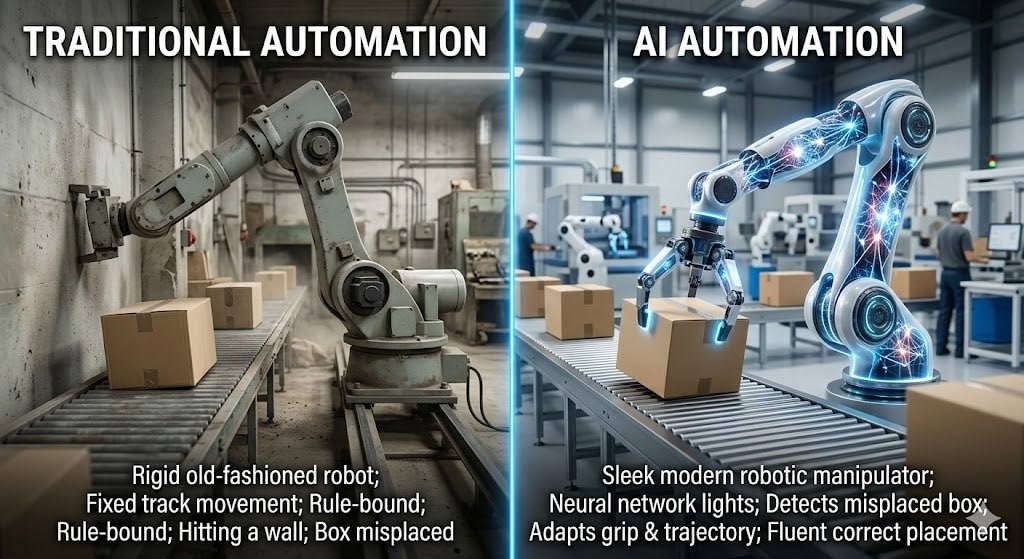
A lot of business leaders use "RPA" and "AI automation" interchangeably. They're not the same thing, and the difference matters when you're deciding where to invest.
Put simply: RPA is excellent at doing the same thing over and over without mistakes. AI automation is what you need when the thing you're automating isn't always the same.
Why This Matters for Modern Businesses
The modern business environment doesn't slow down for anyone. Companies that still rely entirely on manual labor or outdated software don't just fall behind — they get priced out.
Here's the core problem: human capital is the most valuable asset a company has. When skilled employees spend their days copying data between systems, something is deeply wrong. That's not what those people were hired to do. Intelligent systems fix that bottleneck — not by replacing people, but by clearing the path so people can focus on work that actually requires them.
There's a customer expectations angle, too. People today want instant responses and seamless service. AI provides the ability to operate around the clock without fatigue, handling requests across time zones without degradation in quality. This level of performance used to be a competitive differentiator. Increasingly, it's just the baseline expectation for any business that wants to stay relevant.
Real-World Examples of AI Automation in Business
The theory is useful, but the applications are where things get concrete. Companies across virtually every industry are already deploying intelligent workflows to optimize their operations.
Customer Service Automation

Modern AI-powered customer support goes well beyond the clunky chatbots of five years ago — the ones that responded to everything with a link to the FAQ page. Today's intelligent support systems can read an incoming email, assess the customer's sentiment (frustrated? confused? satisfied?), and instantly process complex requests like refunds or order modifications.
The result is support tickets resolved in seconds rather than days, without a human agent needing to be involved for every single case. For a deeper look at how these systems are built, see our comprehensive guide on How AI Can Automate Customer Support in CRM Systems.
Marketing & Sales Automation
Sales environments generate enormous amounts of data, which makes them a natural fit for machine learning. Intelligent systems analyze historical buyer behavior to predict which leads are most likely to convert — and they do it at a speed and scale no human team could match.
The software scores leads automatically, prioritizes them for the sales team, and can even draft highly personalized outreach emails based on a prospect's industry, company size, and past interactions with your brand. Sales reps stop spending time on manual research and spend more time on what they're actually good at: closing.
Finance & Operations Automation
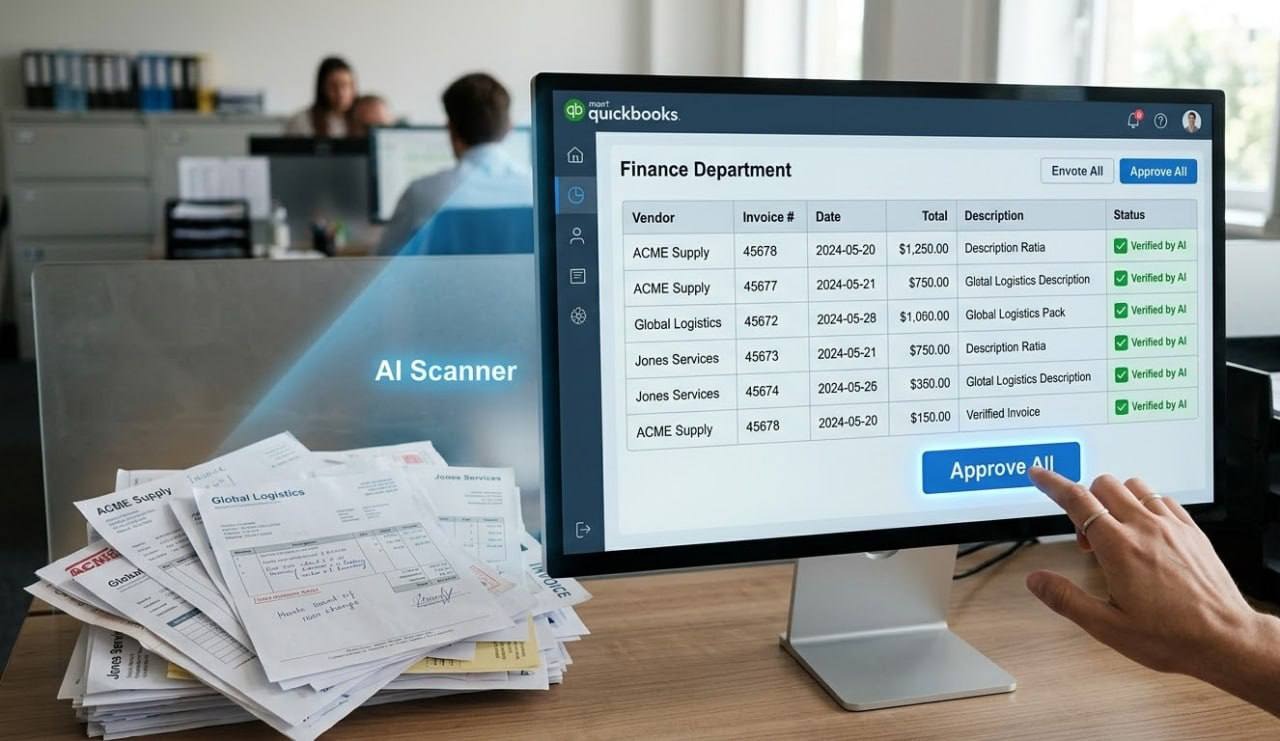
Finance teams handle some of the most sensitive, error-prone data in any organization. An AI-powered system can read vendor invoices, cross-reference them against purchase orders, and schedule payments — all without a human touching a keyboard. Errors that used to slip through manual review get caught consistently.
Beyond accounts payable, the same technology powers inventory forecasting, fraud detection, and back-office reconciliation. For more operational use cases, take a look at our article on 7 Ways AI Automation Can Transform Your Daily Business Operations.
The Real Benefits — Beyond Just Saving Time
There's a tendency to reduce the case for AI automation to "it saves time." That's true, but it undersells the actual impact. The advantages cut much deeper than efficiency.
Significant Cost Reduction Handling high-volume tasks automatically reduces the need for large administrative teams and — critically — cuts down on the cost of human errors, which in industries like finance or healthcare can be substantial.
Flawless, Consistent Accuracy Machines don't get tired, distracted, or have bad days. Data gets processed the same way every time, which matters enormously for compliance and record-keeping.
Infinite Scalability A software system handles ten invoices and ten thousand invoices with identical effort. This means a business can grow its client base without proportionally growing its overhead. That's a fundamentally different unit economics model.
Better Work for Your People This one gets underestimated. Removing mind-numbing administrative work from people's days doesn't just improve productivity — it improves morale. Employees who are assigned creative, strategic, problem-solving work feel more valued. They tend to stay longer, too.
How to Get Started With AI Automation
One of the most common misconceptions is that adopting this technology requires a massive, disruptive overhaul. It doesn't. The most successful implementations — the ones that actually stick — follow a phased approach.
Start with an honest audit. Look at your current operations and ask: what's repetitive, highly manual, and prone to human error? Those tasks are your first candidates. They're low-hanging fruit that will deliver quick wins and build organizational confidence in the technology.
Don't go it alone. AI automation implementations that struggle usually do so because the technical architecture wasn't set up correctly from the start. Partnering with experts who understand enterprise systems makes a real difference.
At ZeroOne Tech, we specialize in building customized software solutions and implementing robust platforms like Odoo and Zoho One. We start by analyzing your specific operational needs, then deploy AI tools that integrate cleanly with your existing infrastructure — so the transition is smooth and the return on investment is measurable from day one.
Final Thoughts
Artificial intelligence is no longer the territory of sci-fi films or trillion-dollar tech companies. It's a practical, accessible tool designed to solve real business inefficiencies — and the entry point has never been lower.
By embracing AI automation, organizations don't just save time today. They build something more durable: resilient, scalable systems that can handle whatever modern market demands throw at them, while giving their people the space to do the kind of work that genuinely requires human intelligence.
That combination — smart systems and empowered people — is what future-proofed businesses are actually built on.
Frequently Asked Questions
1. What is AI automation in simple words?
It's software that uses artificial intelligence to "think" and make decisions, paired with automation tools that actually carry out the task. It does the clicking and the typing — but unlike traditional automation, it also understands what it's doing and why.
2. Is AI automation only for large enterprises?
Not even close. Cloud computing and scalable SaaS platforms have made this technology genuinely accessible to small and medium-sized businesses. A company can start with a single automated workflow, prove the value, and expand from there at its own pace.
3. How is AI automation different from RPA?
Robotic Process Automation follows pre-set rules without deviation. The moment something changes — a different invoice format, an unexpected field — RPA breaks. AI automation uses machine learning to handle variations, read unstructured data, and make independent decisions when the path forward isn't perfectly scripted.
4. What industries benefit most from AI automation?
Almost every sector sees meaningful gains, but finance, healthcare, retail, and customer service tend to see the highest and fastest impact. The common thread is high data volume combined with a heavy load of repetitive administrative tasks.
5. How much does AI automation cost?
The range is wide. A focused intelligent plugin might run a few hundred dollars a month. A custom enterprise-level ERP integration is a larger capital investment. The frame that matters, though, isn't cost — it's ROI. In most implementations, the labor savings and error reduction offset the implementation costs faster than most businesses expect.

.png)
.png)

