


What Is Business Intelligence? A Practical Guide for Decision Makers (2026)
Every time a customer clicks a link, an invoice is paid, or a product leaves your warehouse, your business generates data. Most companies are sitting on years of it stored across CRMs, ERPs, spreadsheets, and analytics platforms that never quite talk to each other.
But here's the problem: data by itself doesn't tell you anything. It needs structure, context, and the right lens to become useful.
Business intelligence is that lens. At its core, BI is the strategic combination of technologies, tools, and practices used to transform raw company data into clear, actionable insight. Instead of guessing, relying on gut feeling, or waiting weeks for a manual report, decision-makers can see exactly what's happening across their business in real time.
Done well, a BI system doesn't just show you numbers. It shows you why the numbers look the way they do, and what to do about it.
Defining Business Intelligence (BI)
Strip away the buzzwords and what is business intelligence, really? Think of it as a digital translator for your organization.
Your business speaks in numbers, sales figures, website traffic, inventory counts, support resolution times. The problem is that raw numbers, without context or visual structure, are almost impossible to reason about quickly. A wall of spreadsheet data tells you something happened, but it doesn't tell you why, where, or what to do next.
BI software takes that overwhelming volume of numbers and turns it into something humans can actually use. Charts, graphs, heat maps, and trend lines visual stories that make the health of your business instantly readable.
Instead of spending an afternoon digging through exports, you can get answers to questions like "Why did revenue drop last Tuesday?" or "Which product line carried us through Q3?" in seconds. That speed changes the quality of decisions at every level of the business.
How Business Intelligence Works
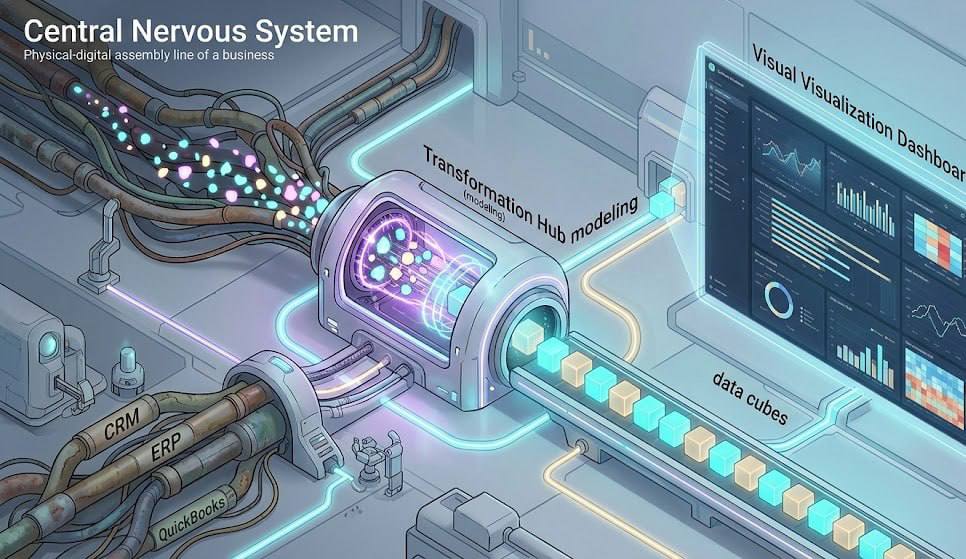
The mechanics of BI follow a logical pipeline. Data comes in messy, scattered, and often incompatible and the system refines it into something strategic. Here's how that process works, step by step:
- Data Collection : The system automatically extracts raw data from your CRM, ERP, eCommerce platform, website analytics, and financial software. No manual exports, no copy-pasting between tools.
- Data Transformation: The software cleans what it collects, removing duplicates and reformatting inconsistencies so that different internal systems can communicate without triggering errors. This step is less glamorous than it sounds but absolutely critical — bad input produces bad insight.
- Data Modeling ;The platform organizes cleaned data into logical relationships, linking things like sales metrics to warehouse inventory levels or marketing spend. This is what makes cross-department analysis possible.
- Data Visualization : Finally, the tools present this structured information on an interactive dashboard. You can drill down into specific metrics with a single click, filter by region, date range, or department, and share live reports with stakeholders who don't need to touch the underlying data at all.
Each step depends on the one before it. A beautiful dashboard built on poorly cleaned data is worse than no dashboard at all; it gives you false confidence in bad numbers.
Core Components of a BI System
A well-functioning BI setup isn't a single piece of software you install overnight. It's three interconnected layers, each doing a specific job. At ZeroOneTech, we build these frameworks from the ground up, ensuring each component works reliably before moving to the next.
Data Sources & Integration
Your data currently lives in multiple disconnected places. Your sales team uses a CRM, your accountants use QuickBooks, and your marketing team tracks performance across Google Ads and Meta. The first layer of any solid BI architecture involves building secure pipelines typically via APIs that automatically pull this data from each source without human intervention.
The goal is a system that keeps itself updated. Every morning, decision-makers should be looking at data from yesterday, not from last week.
Data Warehousing
You can't run heavy analytical queries on your live operational databases without slowing them down significantly. A data warehouse solves that. It's a centralized, secure storage environment built specifically for deep analysis separate from the systems your team uses day-to-day.
Think of it as the difference between your working desk and a well organized filing room. The filing room holds everything, organized for retrieval. Your desk is for getting things done right now. You need both.
The warehouse creates a single, undisputed source of truth for the entire company, one set of numbers that finance, sales, and operations can all agree on.
Reporting & Dashboards

This is the layer decision makers actually see. Instead of staring at an endless Excel grid, users log into a clean interface where tools like Power BI or Tableau present complex datasets as clear, interactive visuals.
KPIs appear at a glance. Trends surface without anyone having to dig. And with self-service BI becoming the norm in modern platforms, a marketing manager can generate a detailed performance report in minutes without filing a request with the IT department.
For a closer look at how visual reporting affects strategic decision-making, see our guide on How Data Visualization Can Improve Business Decisions.
Why Business Intelligence Matters Today

In a market where consumer trends shift overnight, waiting until the end of the month to review a static financial report creates real blind spots. Your competitors who have invested in BI aren't guessing anymore. They're adjusting on the fly pricing, inventory, campaign spend because their dashboards update continuously.
Research published by Harvard Business Review consistently finds that companies with strong data cultures make faster, higher-quality decisions and innovate more reliably than those relying on intuition and delayed reporting.
Here's what that looks like in practice:
- It eradicates guesswork. You no longer launch products or scale operations based on assumptions. Every major move is backed by concrete historical evidence and real-time signals.
- It surfaces hidden bottlenecks. A dashboard might reveal that while overall sales look healthy, one warehouse location is consistently delaying shipments by 48 hours silently damaging retention and reviews.
- It empowers non-technical staff. Modern BI platforms are built for self-service. A department head can pull their own numbers without depending on a data team to run a custom query.
- It creates organizational alignment. When every department is working from the same dashboard with the same numbers, the same definitions cross-functional decisions become faster and less political.
The shift from reactive to proactive decision-making is where the real ROI lives. It's not about having more data. It's about having less confusion about what the data means.
Common BI Use Cases Across Departments
Theory only goes so far. Here's how different teams actually apply business intelligence day-to-day.
Sales Performance Tracking
Sales directors use BI to monitor pipeline health with precision that wasn't possible five years ago. Instead of interrupting reps to ask for manual updates, managers view a live dashboard showing win rates, average deal sizes, and individual rep performance against quarterly quotas.
More importantly, they can see where deals are stalling. If opportunities consistently die at the proposal stage, that's a data-backed signal to review pricing or restructure the pitch not a hunch, not a feeling.
Customer Behavior Analysis
Marketing teams rely on BI to map the complete customer journey across channels. By analyzing purchase histories and website interactions side-by-side, they can identify which campaigns generate customers with the highest lifetime value and which ones bring in buyers who churn in 30 days.
According to McKinsey & Company's research on customer experience, data-driven organizations are significantly more effective at acquiring, retaining, and growing profitable customer relationships. That's not because they have more data it's because they've built systems to actually use it.
Operational Efficiency
For supply chain managers, BI is as close to a crystal ball as operational planning gets. Dashboards track inventory levels across multiple locations, flag potential stockouts before they happen, and model shipping route efficiency based on real cost data.
The result: fewer emergency orders, less overstocking, and more confident planning for seasonal demand.
How to Get Started with BI in Your Company
Implementing a data strategy doesn't have to be overwhelming. The most successful rollouts follow a structured, phased approach starting small, proving value, then expanding.
A few things worth noting from experience:
Starting with too many KPIs is one of the most common mistakes. Dashboard clutter is real, and it leads to important signals getting ignored. Pick the metrics that cause the most disagreement in your weekly meetings; those are usually the ones worth tracking first.
And don't underestimate the data cleaning step. Companies frequently discover in this phase that their CRM has hundreds of duplicate records, or that "revenue" means something slightly different in sales versus finance. Resolving those inconsistencies before building dashboards saves enormous amounts of time later.
If you're unsure which software stack fits your operational structure, our breakdown of Top Business Intelligence Tools for Growing Companies covers the major platforms in detail. For custom, high performance setups, ZeroOneTech's engineering team designs Power BI dashboards tailored to your specific data architecture and reporting needs.
Final Thoughts
Business intelligence isn't a technology trend, it's the infrastructure behind modern decision-making. When it's working well, it changes how your entire organization operates: less debate about what the numbers say, more focus on what to do about them.
The good news is that BI is no longer out of reach for growing businesses. Cloud-based platforms, pre-built connectors, and self-service tools have made serious data infrastructure accessible at almost any scale. A small team can get meaningful dashboards running in weeks with the right setup.
Whether you're starting with a single sales dashboard or building out a full enterprise data warehouse, the first step is the same: decide which questions your business most needs answered and build backward from there
FAQs
1) What is business intelligence in simple terms? It's software that takes your company's messy, raw data and turns it into easy-to-read visual charts and reports. Leaders can instantly see what's performing well and what isn't so they can make faster, better-informed decisions without waiting on manual reports.
2) Is business intelligence the same as data analytics? They're closely related but serve different purposes. BI focuses on descriptive analytics understanding what happened and what's happening right now. Data analytics, especially advanced analytics, leans toward predictive forecasting (what will happen) and prescriptive modeling (what actions to take). BI is usually the starting point; advanced analytics builds on top of it.
3) What tools are used for business intelligence? The market is dominated by platforms like Microsoft Power BI, Tableau, and Qlik Sense. Modern ERP systems like Odoo and Zoho One also include capable built-in BI modules which makes them particularly practical for growing businesses that want reporting integrated directly into their operations.
4) Do small businesses need BI? Yes though not necessarily at enterprise scale. Lightweight BI dashboards let small teams accurately track cash flow, monitor marketing spend efficiency, and manage local inventory without hiring a dedicated data scientist. The entry point has dropped considerably over the past few years.
5) How does BI relate to ERP and CRM? Your ERP and CRM are the operational systems that generate and store raw data daily sales figures, customer records, inventory movements. Business intelligence sits as an analytical layer on top of them, pulling that data out and turning it into visual insight that leadership can act on. They're not competing systems, they work better together.


