


How AI Can Automate Customer Support in CRM Systems
Customer support starts to break long before businesses notice it. Response times stretch. Tickets sit unresolved. Customers repeat themselves across channels. CRM systems fill up, but clarity does not improve.
The issue is not the CRM itself. The issue is how support workflows are handled inside it.
AI changes this by removing repetitive work from support teams and structuring how requests move through the system. It does not replace support. It reorganizes it.
At ZeroOne, this is one of the clearest operational upgrades a business can make. Support is already data-driven. AI simply makes that data usable in real time.
Short answer: AI automates customer support in CRM systems by handling repetitive queries, classifying and routing tickets, drafting responses, summarizing conversations, and prioritizing issues based on urgency and customer context.
Where CRM Support Breaks at Scale
CRM systems are designed to store interactions. They are not designed to manage workload efficiently on their own.
As volume increases, three patterns appear.
First, response time becomes inconsistent. Some tickets get handled quickly, others wait too long. There is no clear prioritization beyond manual judgment.
Second, support quality starts to vary. Different agents respond differently to similar problems. Knowledge becomes fragmented across the team.
Third, operational visibility weakens. Managers see ticket volume, but not root causes or recurring patterns in a usable way.
This creates a gap between having customer data and using it effectively.
AI sits exactly in that gap.
How AI Fits Into CRM Support Workflows
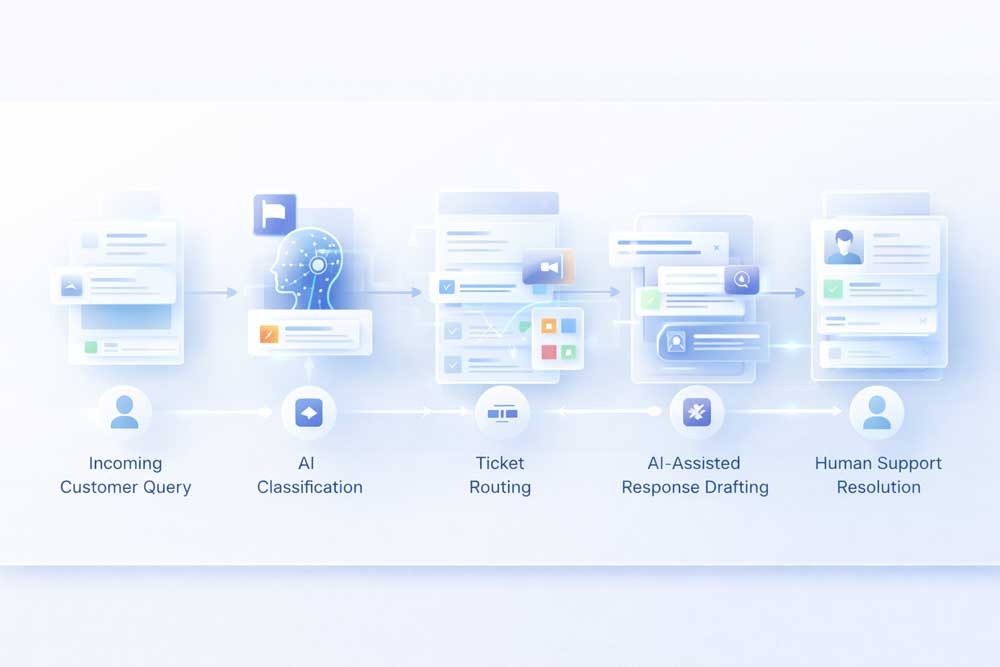
AI does not replace the CRM. It acts as a decision layer on top of it.
Instead of agents manually processing every request step by step, AI handles the early stages of interaction and prepares the context before a human even gets involved.
This is not a feature upgrade. It is a workflow redesign.
Core Areas Where AI Automates Customer Support
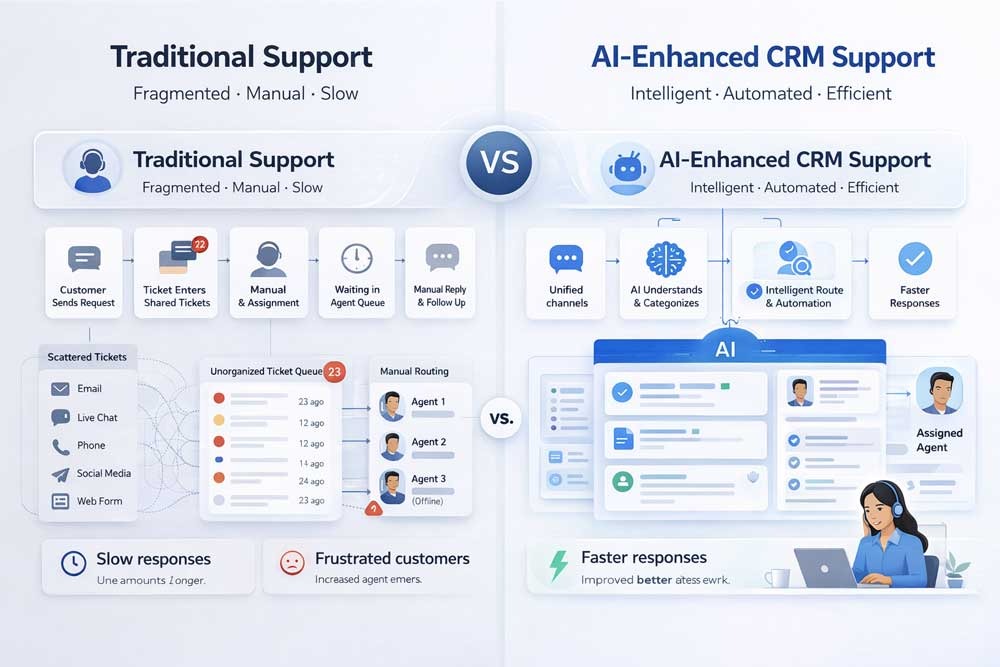
AI brings the most value in areas where repetition and delay exist. These are the points where support teams lose the most time.
Handling Repetitive Queries
A large portion of support volume comes from predictable questions. These are not complex. They are frequent.
AI can respond to these instantly using structured knowledge from the CRM, FAQs, and previous interactions. This reduces the number of tickets that require human attention.
More importantly, it ensures that customers receive consistent answers every time.
Intelligent Ticket Routing
In traditional systems, routing depends on someone reading the request and deciding where it should go.
AI removes this step by understanding the intent of the message as soon as it arrives. It assigns tickets based on:
- Type of issue
- Customer segment
- Urgency level
- Historical context
This reduces idle time between submission and action.
AI-Assisted Response Drafting
Writing responses consumes more time than most teams expect. Even experienced agents spend a large portion of their day composing replies.
AI generates response drafts based on:
- Customer history
- Previous similar cases
- Company tone and guidelines
- Current issue context
The agent does not start from zero. They review, adjust, and send.
This improves both speed and consistency without removing human oversight.
Conversation Summarization
Long support threads create friction. When tickets move between agents, context is often lost.
AI continuously summarizes conversations, making it easier for any agent to understand:
- What the issue is
- What has already been done
- What the current status is
This reduces repeated questions and improves handoffs.
Priority and Urgency Detection
Not all tickets carry the same weight. Some represent churn risk. Others are minor.
AI evaluates incoming requests based on signals such as:
- Customer value
- Sentiment
- Issue severity
- Time sensitivity
High-impact cases are surfaced immediately. This ensures that critical issues are not buried under volume.
What This Means for Support Teams

The impact of AI in CRM support is not limited to efficiency. It changes how teams operate.
Agents spend less time on repetitive tasks and more time on complex issues. This improves both job quality and performance.
Consistency improves across the board. Customers receive clearer, faster, and more predictable responses.
Managers gain visibility into support patterns. Instead of reacting to volume, they can identify root causes and adjust processes.
Support becomes less reactive and more structured.
AI Changes More Than Response Speed
Most businesses first look at AI in support through the lens of speed. Faster replies matter, but speed is only the surface-level improvement. The deeper value is structural.
When AI is embedded properly into CRM support, it changes how support quality is distributed across the business. Teams no longer rely as heavily on individual memory, writing style, or experience level to deliver a consistent customer interaction. The system itself begins to carry part of the operational intelligence.
That matters because support quality often breaks unevenly. One agent handles context well. Another misses key history. One team follows up properly. Another leaves gaps. AI reduces that inconsistency by making support workflows more standardized without making them feel robotic.
This is where customer support starts to behave less like a reactive department and more like an operational system. That shift improves not only speed, but also reliability, continuity, and customer confidence over time.
Operational Benefits for the Business
From a business perspective, AI-driven support inside CRM systems affects three key areas.
First, cost structure. Fewer repetitive tasks mean the same team can handle higher volume without proportional growth in headcount.
Second, customer experience. Faster responses and consistent communication improve trust and reduce frustration.
Third, scalability. As the business grows, support does not become a bottleneck. The system adapts instead of breaking.
These changes are not theoretical. They are operational.
Why AI Support Matters More in Complex Businesses
The value of AI support becomes even more visible in businesses where customer interactions are not simple or one-dimensional.
In SaaS companies, support often overlaps with onboarding, product education, account health, and retention. In service businesses, customer support frequently blends with scheduling, quoting, updates, and post-service communication. In B2B environments, support requests often involve account-specific context, internal approvals, and multiple stakeholders.
This is where manual CRM support becomes fragile. The issue is no longer ticket volume alone. It is workflow complexity.
AI helps reduce that complexity by interpreting requests within the broader customer relationship instead of treating every message like an isolated support event. That creates better continuity across the full customer journey.
For businesses with layered service models, AI in CRM support is not simply a productivity upgrade. It becomes part of how customer operations stay coherent as the business grows.
Where Most Implementations Fail
Despite the potential, many businesses fail to get real value from AI in CRM systems.
The problem is not the technology. It is how it is implemented.
One common mistake is treating AI as a standalone tool. Without integration into CRM workflows, it creates another layer instead of simplifying the system.
Another issue is poor data structure. If the CRM data is inconsistent, AI outputs will also be inconsistent.
There is also a tendency to over-automate. Removing human oversight too early leads to poor customer experiences.
AI works best when it supports agents, not replaces them.
How to Approach AI in CRM the Right Way

The correct approach is not to automate everything at once. It is to start with the highest-friction areas.
Begin with repetitive queries. Then move to routing. Then assist response drafting.
Each step should reduce friction without disrupting the support flow.
Over time, the system becomes more reliable, and more layers can be automated safely.
The goal is not full automation. The goal is structured support.
Designing an AI-First Support Layer Inside CRM
The strongest implementations do not start by asking what AI features to install. They start by asking where support friction exists inside the system.
That usually means mapping the support journey from intake to resolution and identifying where time, clarity, or consistency gets lost. In many CRM environments, those weak points appear in ticket classification, handoff quality, response drafting, escalation logic, and case visibility.
Once those areas are clear, AI becomes easier to implement with purpose. Instead of acting as a generic assistant, it becomes a structured support layer with a defined role inside the workflow.
This is an important distinction. Businesses that add AI without redesigning support processes usually create more noise. Businesses that redesign the workflow first tend to create support systems that are faster, cleaner, and easier to scale.
That is where AI stops being a feature and starts becoming infrastructure.
What to Automate First in CRM Support
Most businesses do not need to automate every part of support at once. The better approach is to start with the tasks that create the most friction, delay, or repetition inside the CRM. This is usually where AI produces the fastest operational return.
Final Take
AI in CRM support is not about adding intelligence to a system. It is about removing inefficiency from workflows.
When implemented correctly, it reduces delays, improves consistency, and allows support teams to focus on work that requires human judgment.
Businesses that treat support as a structured system gain a clear advantage. Those that rely on manual processes eventually hit operational limits.
AI simply accelerates which side of that line a business ends up on.
FAQ
Does AI replace human customer support agents?
No. It reduces repetitive work and supports agents, but complex issues still require human involvement.
Is AI support only useful for large companies?
No. Smaller teams benefit even more because it allows them to handle growth without expanding headcount quickly.
How accurate are AI-generated responses?
Accuracy depends on data quality and system setup. With proper configuration, responses remain consistent and reliable.
Can AI handle multi-channel support inside CRM?
Yes. AI can process requests from email, chat, forms, and other channels within a unified system.
How long does it take to implement AI in CRM support?
Initial improvements can be implemented quickly, especially for repetitive queries and routing. More advanced automation takes longer depending on system complexity.


